Circuitous Posted August 4, 2010 Author Posted August 4, 2010 I've been ripping them slowly over time. When people need specific ones I give them up. Beyond that I'm waiting until I have them all done and neatly organized before I release them. Same goes for pretty much everything that isn't sprites, although I'll be re-ripping all of the sprites eventually too.
Bolverk-GTM Posted August 5, 2010 Posted August 5, 2010 Order Sol would be more accurate. *Le-Gasp* That settles it! If Makoto is awesome enough to sport Order-Sol colors, I must sub her! *w*
secretsof2113 Posted August 5, 2010 Posted August 5, 2010 if you are asking for makoto's GG color..... it's Sol...... bout 2 post before is where her whole color chart's posted :/...... Are you sure it's Order Sol? Looks like Jam to me.
Naki Feralkin Posted August 5, 2010 Posted August 5, 2010 I don't mean to sound beligerent.. but that's Jam's colors.. no? Edit: lawl beaten.
Naki Feralkin Posted August 5, 2010 Posted August 5, 2010 ^ We were just comparing sprites just now, and found out that Litchi was the one with Jam's sprite. I just made the assumption because Jam and Makoto play a little bit similar to me. Thanks for the clarification.
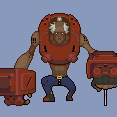
Circuitous Posted August 5, 2010 Author Posted August 5, 2010 Arakune as Eddie http://i37.tinypic.com/ru7246.png Bang Shishigami as Anji Mito http://i34.tinypic.com/29z4kkl.png Carl Clover as A.B.A. http://i38.tinypic.com/rs7llt.png Hakumen as Baiken http://i38.tinypic.com/2q158ya.png Hazama as Venom http://i37.tinypic.com/16a88xx.png Iron Tager as Potemkin http://i36.tinypic.com/soxp39.png Jin Kisaragi as Ky and Robo-Ky http://i36.tinypic.com/33etq15.png Lambda-11 as Justice http://i37.tinypic.com/2q81ytd.png Litchi Faye-Ling as Jam Kuradoberi http://i35.tinypic.com/28bqxk3.png Makoto as Order-Sol http://i35.tinypic.com/n5r52b.png Mu-12 as Dizzy http://i33.tinypic.com/51f48h.png Noel Vermillion as I-No http://i35.tinypic.com/n6q2yo.png Rachel Alucard as Slayer http://i34.tinypic.com/34y1bfp.png Ragna the Bloodedge as Sol Badguy http://i34.tinypic.com/2qs52tf.png Taokaka as May http://i33.tinypic.com/5b32x.png Tsubaki Yayoi as Millia Rage http://i36.tinypic.com/1tuc1w.png Added to first post. If anyone ever asks who's who, direct them here and speak no further of it.
SoWL Posted August 5, 2010 Posted August 5, 2010 Arakune as Eddie http://i37.tinypic.com/ru7246.png Wouldn't it be more demonstrative to put Zato's body on that image? You know, with the red blindfold and stuff.
sesame Posted August 5, 2010 Posted August 5, 2010 I KNEWWW IT! (happy got it right =D) (i was half asleep when i replied yesterday -w-........) and i think my favorite is .... Hakumen and Carl's GG color LOLz. now only if hakumen have a dustloop..............................(tsubaki look? =D)
sakabato24 Posted August 5, 2010 Posted August 5, 2010 I like Hakumen's, Rachel's, and Tsubaki's. They look great!
Beatrice Posted August 5, 2010 Posted August 5, 2010 Tao's is adorable! =O But I also <3 Hakuman's. Cause that's a hot pink. (No punlol) ... May-Tao... ... Mao?
Mr Oso Posted August 5, 2010 Posted August 5, 2010 Just made that Carl one my background Never even played GG but that color looks sick nasty on Carl(and Nirvana)
Bolverk-GTM Posted August 5, 2010 Posted August 5, 2010 Welp, in order to make my avatar request easier, I tried to make the animations in GIMP to post as examples of what I'm talking about. One problem though, the BG isn't transparent, it's green instead on Makoto's sprites and I'm using GIMP where Color to Alpha can't be used on indexed images (how annoying...) and I know Circuitous mentioned how to take care of this on Photoshop, but I need to know how to fix this on GIMP if anyone knows. Thanks in advance.
Latiosking Posted August 5, 2010 Posted August 5, 2010 Welp, in order to make my avatar request easier, I tried to make the animations in GIMP to post as examples of what I'm talking about. One problem though, the BG isn't transparent, it's green instead on Makoto's sprites and I'm using GIMP where Color to Alpha can't be used on indexed images (how annoying...) and I know Circuitous mentioned how to take care of this on Photoshop, but I need to know how to fix this on GIMP if anyone knows. Thanks in advance. You can change the pic from indexed to RGB. Go to image then mode to change it.
Bolverk-GTM Posted August 5, 2010 Posted August 5, 2010 Actually I had found another idea that I think will work quite nicely. Is there a way to make transparency your fill color? I used Select by Color to get the entire background selected and now all I need is a way to make it transparent so I first turned to the Bucket Fill tool...yet I can't seem to find a way to make transparency my FG color. Update: Well uhh, that actually worked quite nicely. The GIMP previews are retarded so I thought that Makoto would be half transparent and pink after the color to alpha, but she isn't, so lol. Thanks for the help.
Latiosking Posted August 5, 2010 Posted August 5, 2010 Actually I had found another idea that I think will work quite nicely. Is there a way to make transparency your fill color? I used Select by Color to get the entire background selected and now all I need is a way to make it transparent so I first turned to the Bucket Fill tool...yet I can't seem to find a way to make transparency my FG color. I don't think It can be a color(never tried that before). Color to alpha would seem to be the only option.
FirEmblmFan Posted August 5, 2010 Posted August 5, 2010 Thanks Circ for uploading Makoto sprites, and thanks lurker Oroboros for getting them to him. Oh we're in for a treat now. http://img.photobucket.com/albums/v166/shadowdraygon/BLAZEN/rapehotel.gif Nice pic
Bolverk-GTM Posted August 5, 2010 Posted August 5, 2010 I don't think It can be a color(never tried that before). Color to alpha would seem to be the only option. Well playing with Makoto sprites will be a bit more annoying with that extra step I have to do, but oh well. It's only an extra couple of steps, so it's all good. Thanks again! :D Update: Okay the color to alpha is being annoying now... I just did it again on the same sprite after closing and reopening it and NOW Makoto is half transparent and she's in a shade of pink. When I reconvert to Indexed mode, she has pink blotches on her (wtf...), so the Color to Alpha isn't a 100% way around it yet. I have to figure out what I did to keep it from turning out so wrong the first time. MAJOR UPDATE: Okay to all GIMP users for sprite editing, here's what you have to do to rid of the green background on Makoto's sprites. 1.) Change the Image mode to RGB by going to: Image -> Mode -> RGB 2.) Use the Select by Color tool in your toolbox and click on the green background to select the entire background. 3.) Use the Color to Alpha plug-in by going to: Colors -> Color to Alpha 4.) There'll be a preview here and a big sample color bar underneath of the preview (ignore the preview, since you selected specifically the green background with Select by Color, that's the only part of the image that'll actually change). Click this color bar and it'll bring up the Color to Alpha Color Picker window. 5.) In the Color to Alpha Color Picker window, see the little eyedropper beside the HTML notation dialog box? Click it and then click on the green background in the image to make it the color that will be turned transparent. Now that you've selected the green as the color to be converted to Alpha, click OK in the Color to Alpha Color Picker window. 6.) Click OK in the Color to Alpha window and... 7.) Lastly you want to make sure that you change the image mode back to indexed after you're done with messing around with multiple sprites or whatever, that way you can do color palette swaps with Makoto.
WintySoSolo Posted August 5, 2010 Posted August 5, 2010 setting colormap to mk00_01.act after changing from indexed to RGB and back again resulted in this: http://img.photobucket.com/albums/v244/draconicmage/problem.png setting the same colormap without messing with the image at all resulted in this: http://img.photobucket.com/albums/v244/draconicmage/wut.png When I imported the palette it didn't seem to have the correct colors on the preview thing. Are the palettes(or just 00_01 in particular) bad or did I mess something up?
Bolverk-GTM Posted August 5, 2010 Posted August 5, 2010 setting colormap to mk00_01.act after changing from indexed to RGB and back again resulted in this: http://img.photobucket.com/albums/v244/draconicmage/problem.png setting the same colormap without messing with the image at all resulted in this: http://img.photobucket.com/albums/v244/draconicmage/wut.png When I imported the palette it didn't seem to have the correct colors on the preview thing. Are the palettes(or just 00_01 in particular) bad or did I mess something up? I have no clue what's wrong. From what it looks like, other people are using the other palettes just fine which confuses me. ._. I can recolor any character with the palettes just fine, except for Makoto. All we can really do is wait until someone helps us out or this all gets straightened out somehow. Until then, enjoy this: Kenshiro has taught her well.
Shadow Draygon Posted August 5, 2010 Posted August 5, 2010 FYI, sprites in the effect folders are 50% larger than they should be. HUGE HANDS.
Bolverk-GTM Posted August 5, 2010 Posted August 5, 2010 FYI, sprites in the effect folders are 50% larger than they should be. HUGE HANDS. Really? ._. Well then, I'll have to fix that in a bit. ...Oh crap, I can't, I have to redo the whole thing. >_< Oh well, it won't take as long since I know how to get around my original problem, that green background.
Recommended Posts
Create an account or sign in to comment
You need to be a member in order to leave a comment
Create an account
Sign up for a new account in our community. It's easy!
Register a new accountSign in
Already have an account? Sign in here.
Sign In Now